History and Search
Mycli keeps track of the queries entered in the REPL. The history is persistent across sessions, and has no limit.
The Up/Down arrow keys can be used to navigate the recent history.
Incremental Search
Pressing control-r will enable incremental history search across your entire query history. If you press control-r and then start typing your search term, you will see all past queries narrowed down by that search term. You can cycle through the matches by pressing control-r again.
fzf
If fzf is installed on your system, the control-r incremental search will leverage fzf to provide fuzzy search throughout your entire query history.
The interface provided by the fzf search is completely different than
"vanilla" incremental search, but it is powerful, and recommended. For
example, fzf will allow you to use multiple space-separated search terms to
narrow the search, with the terms given in any order, operating as a logical
AND. Many more advanced searches are possible, such as the use of negated
terms by preceding the term with ! (documented at the
fzf project; see also the manual at man fzf
and fzf --help).
When in the fzf interface, repeating control-r still cycles through past matches, and the arrow keys can also be used to navigate the matches. Press Enter to accept a match, and Escape or control-g to exit the search.
Mycli sets up a full-screen interface for fzf searches, in which
- the top half of the screen shows a fragment of all matching candidates from the history, with highlighted search terms
- the middle line shows the interactive search prompt and search terms
- the bottom half of the screen shows a fuller preview of the current candidate which would be accepted with Enter
Example:
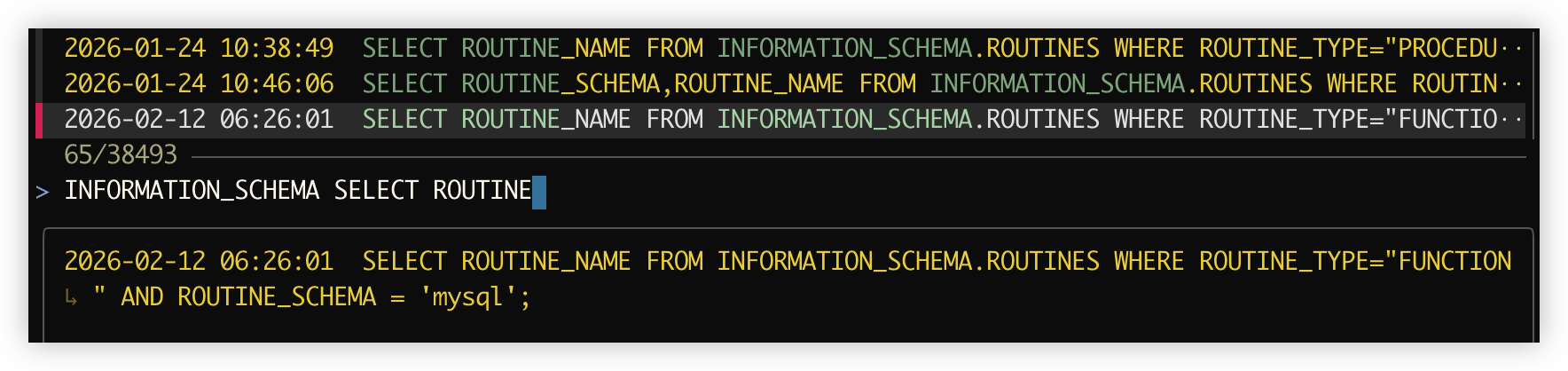
The fzf search is truly "fuzzy" and tolerates spelling errors.
Key Bindings
If you have fzf installed but do not wish to use the fancy fzf interface for
history search, set the following in ~/.myclirc:
[keys]
# possible values: auto, fzf, reverse_isearch
control_r = reverse_isearch